上个月,超过 200 人聚集在我的家乡安大略省剑桥市,大家聚在一起,交流经验,并一窥我们正在开发的一些新东西。
🌐 Last month, over 200 people got together in my hometown of Cambridge, Ontario to hang out, talk shop, and get a peek behind the curtain at some of the new stuff we've been working on.
Tailwind Connect 最初只是一个在团队来访时举办小型本地聚会的想法,但结果自然发展成我们租下了一间巨大的大厅,雇用了四名摄像师团队,并积累了一个连我自己婚礼都望尘莫及的餐饮账单。
不过尽管我们在制作上有点过火,我们真的尽力让它更像一次聚会,而不是一场大型会议。我们选择在晚上举办活动,只安排了一场演讲,尽量留出更多时间让大家一起吃披萨、喝啤酒,随意交流和互动。
🌐 But even though we got a little carried away with the production, we really tried to make it feel more like a meetup than a full-blown conference. We ran the event in the evening and kept it to just one presentation, leaving as much time as possible for people to just hang out and connect over pizza and beer.
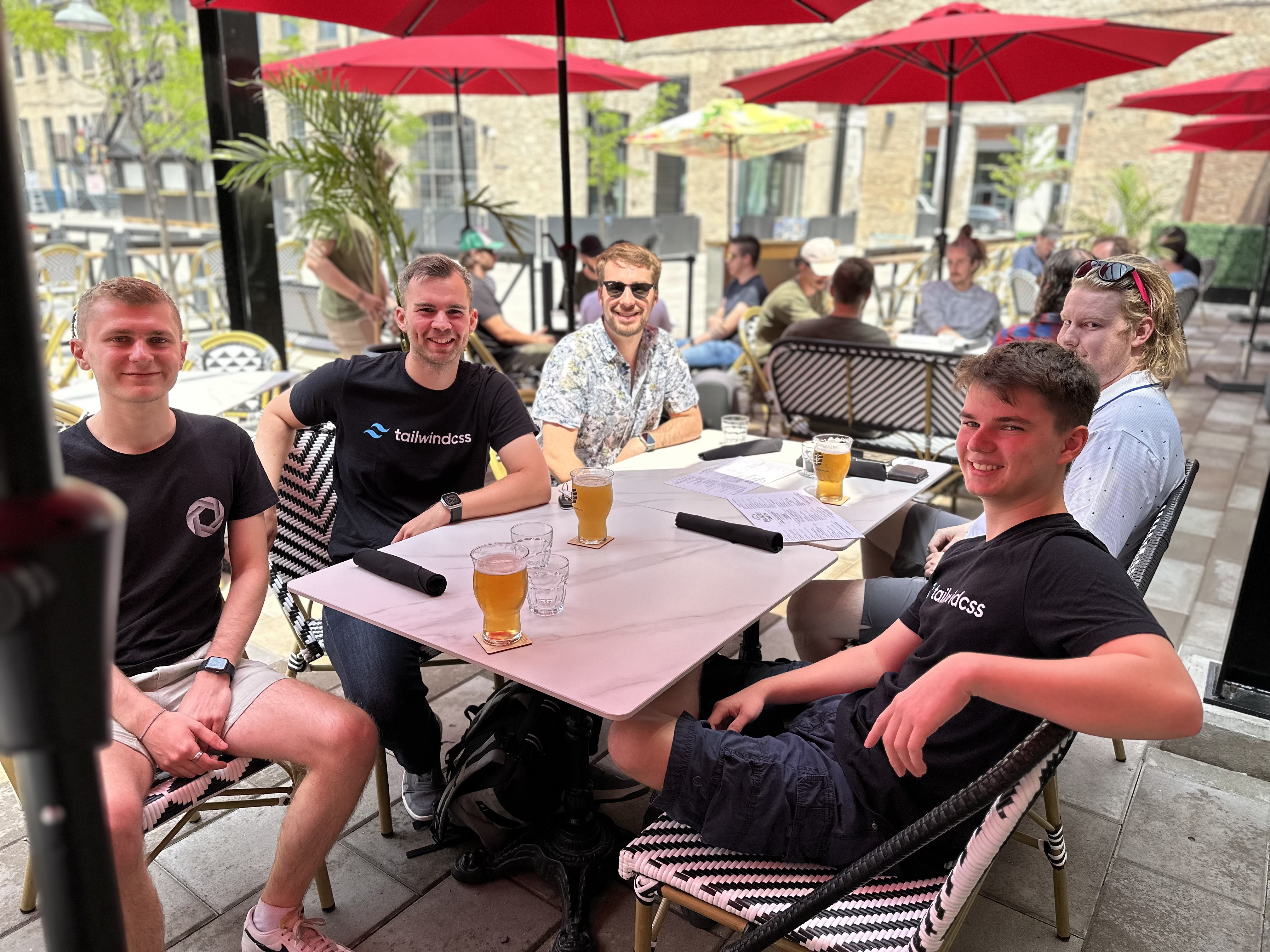
我们原本预计这将是一个“下班后开车过去”的以本地人为主的活动,但实际上几乎一半的到场者是乘飞机来的。为了帮助大家充分利用在这里的时间,我们为活动建立了一个 Discord 服务器,让远道而来的人可以互相计划行程,并且租下了活动场地隔壁的 Foundry Tavern 的露台,整个下午都开放,给大家一个提前聚会结识新朋友的理由。
🌐 We originally expected it to be a "drive there after work" local-heavy event, but almost half of the people who attended traveled by plane to get here. So to help everyone make the most of their time here, we set up a Discord server for the event so people traveling in could make plans with each other, and rented out the patio at the Foundry Tavern next door to the event space for the afternoon to give people a reason to meet up early and make some new friends.
我们在下午 5:30 左右开启了活动,并以一个小时的开幕招待会拉开序幕,大家可以聚在一起聊天,享用一些小吃。
🌐 We opened up the doors for the event around 5:30pm and started the night with an hour long opening reception, where people could hang out and talk and enjoy some canapés.

我认为我们真正做到了的一个细节是徽章 - 当你购买门票时,我们会为你提供一个基本的 Markdown 字段,你可以在其中写下任何你想写的关于你自己的信息,这可能会帮助人们与你展开有趣的对话。
🌐 One detail I thought we really nailed was the badges — when you bought a ticket we gave you a basic markdown field where you could write anything you wanted about yourself that might help people start interesting conversations with you.

我发现自己整晚都在盯着每个人的徽章,这真是一个很棒的方法,可以立即打破僵局,找到一些可以聊的东西。
🌐 I found myself looking at everyone's badges all night and it was an awesome way to immediately break the ice and have something to talk about.
大约在下午6:30,大家都坐下准备观看主题演讲。我从Tailwind CSS作为一个项目的历史开始讲起,以及它是如何发展到今天的。
🌐 At around 6:30pm everyone took a seat for the keynote presentation. I kicked it off with a bit of history on Tailwind CSS as a project, and how it got to where it is today.

六年前,这只是我从一个项目复制粘贴到另一个项目的几份样式表。今天,它每月被数百万开发者下载超过 2500 万次,并被世界上一些最大的公司用来构建世界上一些最大的网站。能够最终有机会与社区中的这么多人一起亲自庆祝我们的进步,这对我来说真的很特别。
🌐 Six years ago it was just a couple of stylesheets I was copying and pasting from project to project. Today it's downloaded over 25 million times per month by millions of developers, and is used by some of the world's biggest companies to build some of the world's biggest websites. It was really special to me to finally get a chance to celebrate how far we've come in person with so many people from the community.
之后,Sam Selikoff 展示了一些精彩的演示,展示了 CSS 中一些最酷的新功能。他演示了像重音颜色、流式排版、标题平衡、容器查询,甚至是砖石网格等功能,全部使用 Tailwind CSS 和以工具为先的工作流程实现。
🌐 After that, Sam Selikoff walked through some brilliant demos showing off some of the coolest new features in CSS. He demoed things like accent color, fluid typography, headline balancing, container queries, and even masonry grid, all using Tailwind CSS and the utility-first workflow.

萨姆是一个很棒的朋友,我邀请他参加活动并成为主题演讲的一部分,实际上我根本没有计划要让他做什么,而他到达后大约在36小时内就完成了整个演讲,并且表现得非常出色。没有幻灯片,全程现场编码,而且表现得像专业人士一样完美。我强烈推荐他的视频通道YouTube和培训网站Build UI —— 这个家伙是个非常棒的老师。
🌐 Sam is an awesome friend, I asked him to come up for the event and be a part of the keynote without really even having a plan for what I was going to ask him to do at all, and he put together his whole presentation in about 36 hours after he arrived and absolutely nailed it. No slides, all live-coding, and crushed it like a pro. Highly recommend his YouTube channel and training site Build UI — dude is a fantastic teacher.
接下来,我简要预览了 Oxide,这是 Tailwind CSS 引擎的下一阶段发展。
🌐 Next, I gave a sneak peek at Oxide, the next evolution of the Tailwind CSS engine.

Oxide 包含很多不同的部分,但它们都归结为两个目标 - 提升性能和简化开发者体验。
🌐 Oxide is a lot of different pieces but they all boil down to two goals — improved performance, and simplifying the developer experience.
我们正在通过集成 Lightning CSS 将 Tailwind 打造成一个更全面的 CSS 处理工具,这意味着在下一版本的 Tailwind 中,像导入其他 CSS 文件、嵌套、浏览器前缀以及未来 CSS 特性的语法转换等功能都将直接可用——无需安装或配置像 autoprefixer 或 postcss-import 这样的额外工具。
🌐 We're making Tailwind more of an all-in-one CSS processing tool by integrating Lightning CSS, which means that in the next version of Tailwind, things like importing other CSS files, nesting, vendor prefixes, and syntax transforms for future CSS features will just work — no need to install or configure any additional tooling like autoprefixer or postcss-import.

Lightning CSS 采用 Rust 编写,速度极快,我们也通过重写一些最关键的路径(例如扫描所有模板文件中的类名)尝试了 Rust。
🌐 Lightning CSS is written in Rust which makes it extremely fast, and we're dipping our toes into Rust ourselves too by rewriting some of most critical paths, like scanning all of your template files for class names.
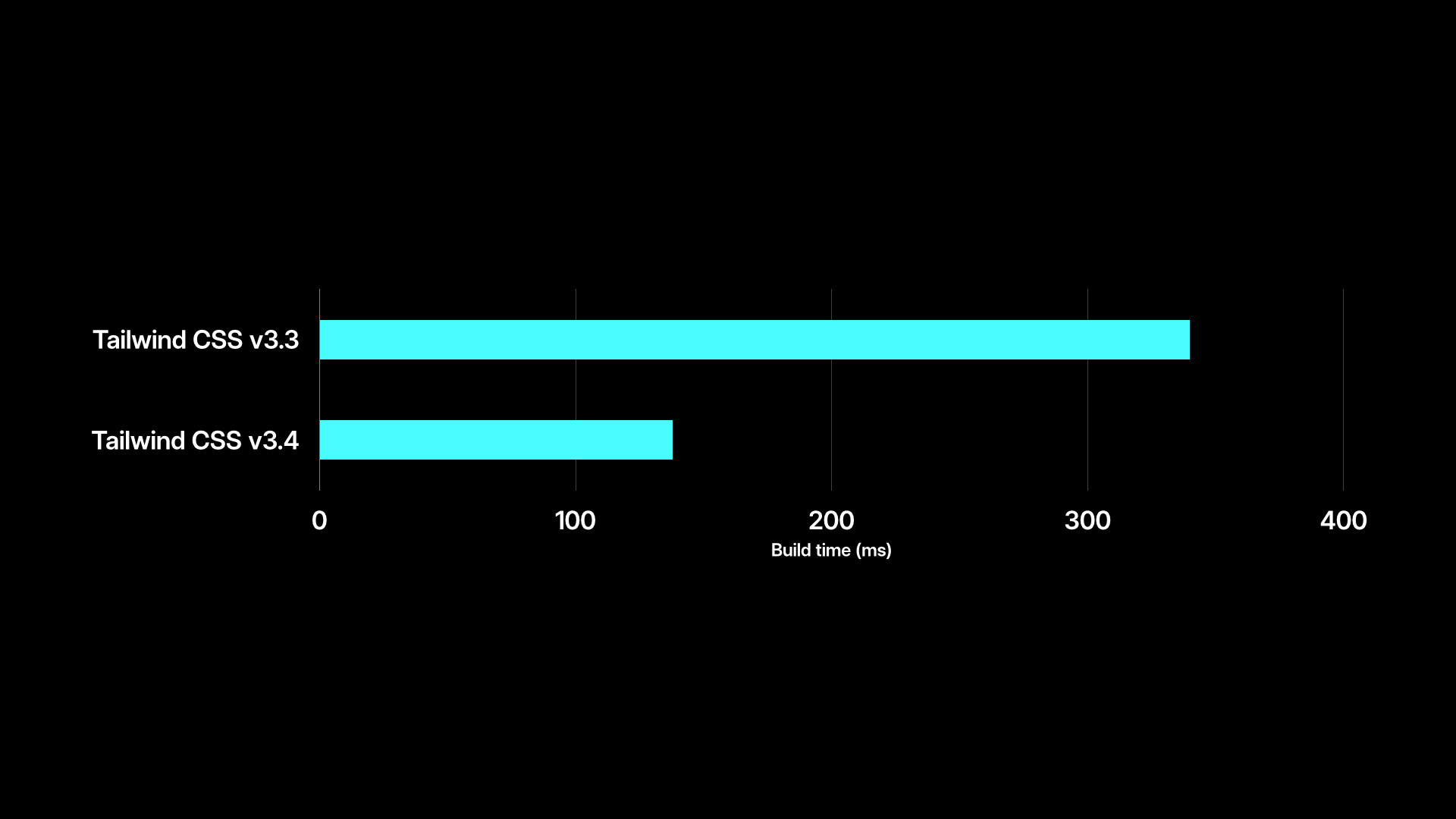
通过这些改进,我们看到实际项目中的构建时间缩短了 50% 以上,即使是我们最大的项目,生产构建时间也缩短到了 150 毫秒左右。
🌐 With these improvements, we're seeing build times drop by over 50% in real-world projects, bringing the production build time down to around 150ms for even our largest projects.
Oxide 还将带来简化的配置体验。我们正在添加自动内容检测,因此你不再需要配置所有模板文件的路径,并且通过在 CSS 文件顶部用一个简单的 @import "tailwindcss" 调用替换所有的 @tailwind 指令,使得将 Tailwind 添加到你自己的 CSS 中变得更加容易。
🌐 Oxide is also going to bring a simplified configuration experience. We're adding automatic content detection so you won't need to configure the paths to all of your template files anymore, and making it even easier to add Tailwind to your own CSS by replacing the need for all of the @tailwind directives with a simple @import "tailwindcss" call at the top of your CSS file.
我还展示了一个非常早期的想法,我们正在探索如何直接在你的 CSS 文件中配置 Tailwind CSS,而不是在 JavaScript 中。通过基于 CSS 的配置、自动内容检测以及简化的导入方式,未来用一些自定义颜色和字体配置 Tailwind 可能看起来就像这样简单:
🌐 I also shared a very early look at an idea we're exploring for configuring Tailwind CSS right in your CSS file instead of in JavaScript. With CSS-based configuration, automatic content detection, and the simplified import story, configuring Tailwind with some custom colors and fonts might look as simple as this in the future:
@import "tailwindcss";@import "./fonts" layer(base);:theme { --colors-neon-pink: oklch(71.7% 0.25 360); --colors-neon-lime: oklch(91.5% 0.258 129); --colors-neon-cyan: oklch(91.3% 0.139 195.8); --font-family-sans: "Inter", sans-serif; --font-family-display: "Satoshi", sans-serif;}我们计划在不进行任何重大更改的情况下引入所有这些功能,其中许多改进(包括 Lightning CSS 集成和我们基于 Rust 的模板解析器)将在未来几个月内于 Tailwind CSS v3.4 中推出。
🌐 We're planning to introduce all of this stuff without any breaking changes, and many of these improvements (including Lightning CSS integration and our Rust-based template parser) will be available in Tailwind CSS v3.4 in the next couple of months.
我肯定会在接近发布的时候更详细地写这些内容,但如果你想提前了解,可以观看主题演讲。
🌐 I'll definitely write about this stuff in a lot more detail closer to release time, but watch the keynote if you want to take a closer look before then.
我们在主题演讲的最后展示了 Catalyst 预览,这是我们自去年年底以来一直在开发的全新 React UI 工具包。
🌐 We closed out the keynote with a preview of Catalyst, the new React UI kit we've been working on since late last year.

到目前为止,此功能已经在我们的路线图上酝酿了两年,经过数月的摸索,最终找到了最佳方案,我们终于在去年 10 月破土动工。
🌐 This is something that's been on our roadmap for two years at this point, and after many months of ironing out the best approach, we finally broke ground on it last October.
Catalyst 是一个自带适配器的组件系统,具有经过深思熟虑的 API,并包含构建自己应用所需的所有基本构建模块。它包括按钮、表单控件、对话框、滑出层、表格、下拉菜单等内容。
🌐 Catalyst is a batteries-included component system with thoughtfully designed APIs, and includes all of the basic building blocks you need to build your own applications. It includes things like buttons, form controls, dialogs, slide-overs, tables, dropdowns, and more.
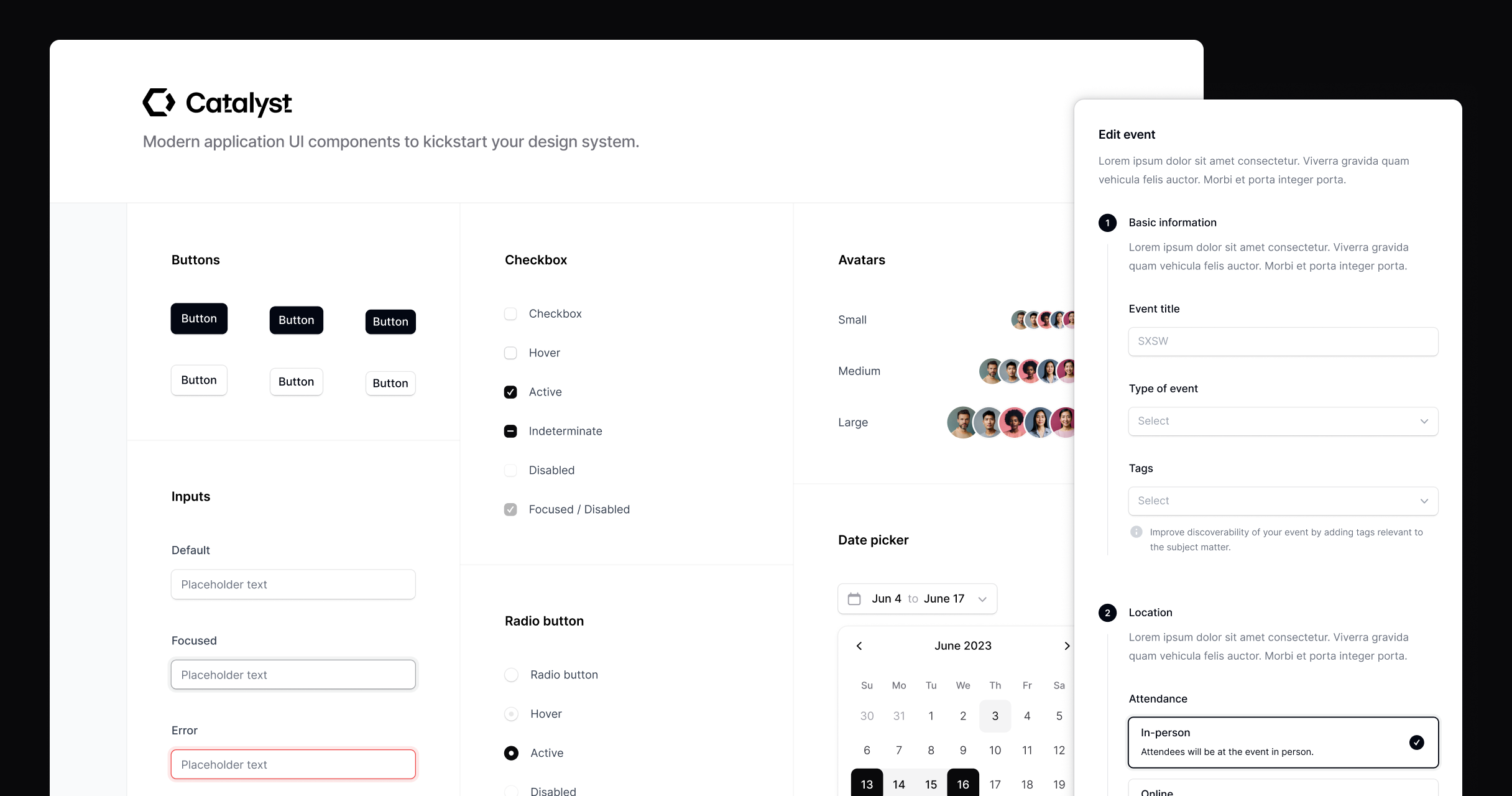
Catalyst 与我们现有的应用 UI 组件示例之间最大的区别在于,Catalyst 中的组件都像在真实项目中一样连接在一起,而不是孤立的复制粘贴代码片段。
🌐 The biggest difference between Catalyst and our existing application UI component examples is that the components in Catalyst are all wired together like they'd be in a real project, instead of being isolated copy and paste code snippets.
但就像我们的网站模板一样,Catalyst 中的代码属于你自己。如果你想修改某些东西,只需打开文件进行修改——它不是通过 npm 安装的库。
🌐 But just like with our site templates, the code in Catalyst is yours. If you want to tweak something, you just open up the file and tweak it — it's not a library you install via npm.
把它当作你自己组件系统的起点。你从我们这里下载最新版本,将 /components 目录的内容复制到你的项目中,然后开始构建。
🌐 Think of it like a starting point for your own component system. You download the latest version from us, copy the contents of the /components directory into your project, then start building.
如果你需要更改某些内容,请更改它。
🌐 If you need to change something, change it.
如果你想创建自己的新组件,请创建它们。
🌐 When you want to create your own new components, create them.
整个想法是,经过六个月后,这个代码库会让你感觉如此属于你自己,以至于你几乎会忘记它最初是通过 Catalyst 启动的。
🌐 The whole idea is that 6 months down the road the codebase feels so yours that you'll almost forget you kickstarted it with Catalyst in the first place.
在介绍完项目并带大家稍微参观了一下后,我把事情交给了Steve Schoger,他出色地讲解了在让Catalyst感觉像一个精致设计系统过程中涉及的所有小设计细节。
🌐 After introducing the project and giving everyone a bit of a tour, I handed things off to Steve Schoger who did an amazing job walking through all of the little design details that went into making Catalyst feel like such a polished design system.

最后,我展示了一些我们用来实现一些设计细节的高级 Tailwind CSS 技巧,比如如何使用 CSS 变量和 Tailwind 的任意属性功能,通过 Framer Motion 实现响应式过渡。
🌐 I wrapped things up by showing off a couple of advanced Tailwind CSS tricks we had to use to implement some of those design details, like how to implement responsive transitions with Framer Motion using CSS variables and Tailwind's arbitrary property feature.

Catalyst 仍在开发中,所以请不要指望我,但如果运气好的话,我们会在下个月左右推出早期版本并分享更多细节,与 Tailwind UI 客户分享。
🌐 Catalyst is still a work-in-progress so don't hold me to it, but with any luck we'll have an early version and more details to share with Tailwind UI customers in the next month or so.
接下来的三个小时,我们在活动场地闲逛,享用茶点,并与所有前来参加活动的嘉宾见面。
🌐 For the next three hours we got to hang out in the event space enjoying some refreshments, and getting to meet all of the people who made the trip to attend.

我在主旨演讲中提到了这一点,但这是项目历史上第一次我们将一群 Tailwind 的粉丝聚集到同一个房间里,对我来说,能够真正见到这么多从使用这个框架中受益的人,这是一种非常特别的体验。当我们的工作成果只存在于 GitHub 和 Twitter 上时,很容易低估它的影响,而看到它在真实空间中与真实的人们相结合,真的让我感到无比自豪。
🌐 I mentioned it in the keynote, but this was the first time in the history of the project that we'd ever gotten a bunch of Tailwind fans into the same room, and it was a really special experience for me to finally meet so many people who have gotten so much out of using the framework. It's easy to sort of underappreciate the impact of the work we do here when everything is just on GitHub and Twitter, and to see it manifested in physical space with real people just left me beaming with pride.
能够参与这些项目,并帮助这么多人在构建网页时获得更多乐趣,真的是一种荣幸。期待将来还能举办类似的活动——这无疑是我人生中的重要亮点之一。
🌐 It's really an honor to work on these projects and be able to help so many people have more fun building things for the web. Looking forward to doing another event like this in the future — a major life highlight for me for sure.
查看Tailwind Connect 2023 相册了解更多活动照片,如果你无法亲自参加,请在YouTube 上观看主题演讲。
🌐 Check out the Tailwind Connect 2023 photo gallery for more photos of the event, and watch the keynote on YouTube if you couldn't make it in person.